Standalone/Computer Vision
Thresholding in Image Processing: Understanding Global, Otsu and Adaptive Methods
Nov 28, 2025·10 min read
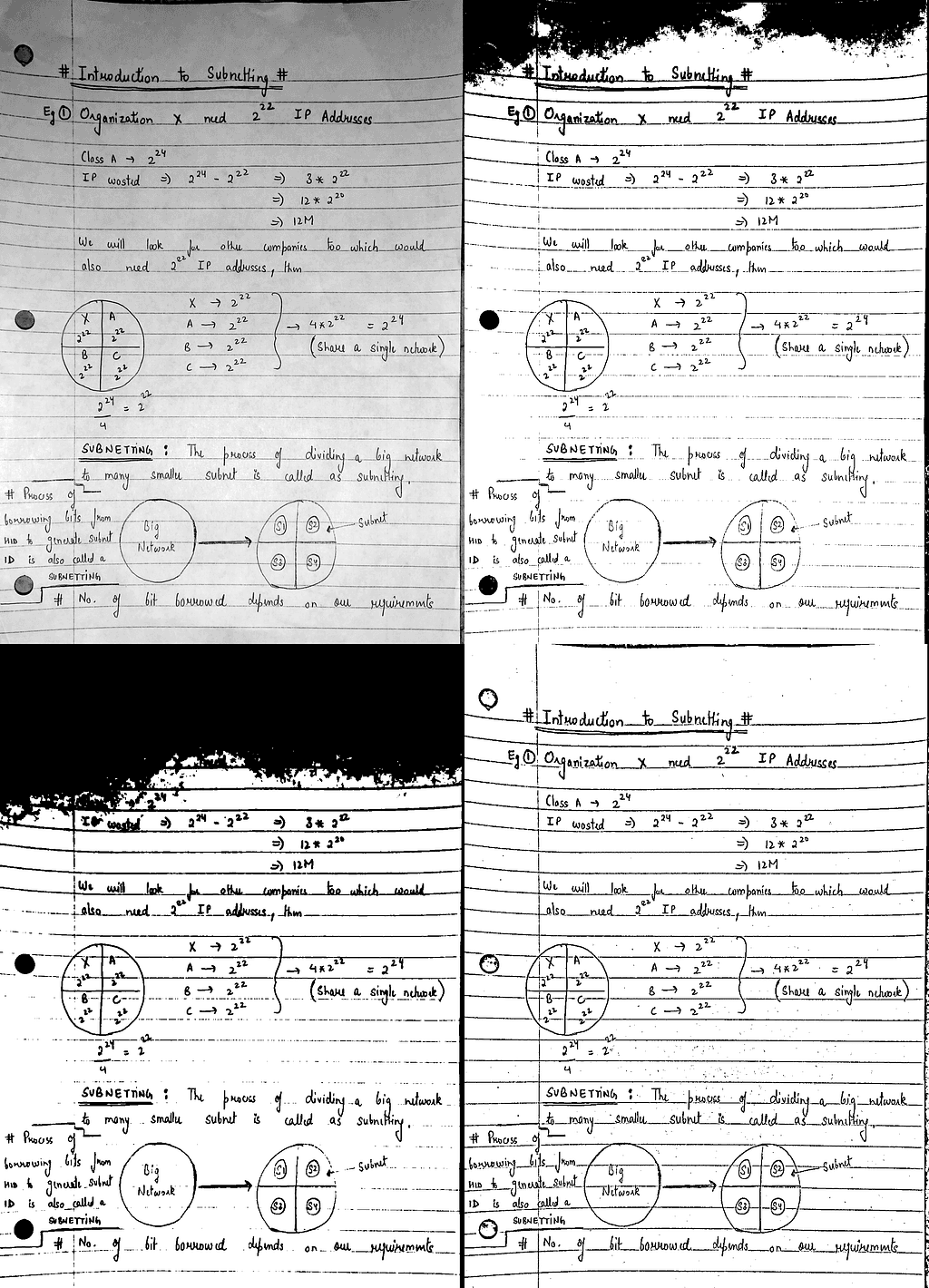
TABLE OF CONTENTS
Introduction
What Thresholding Really Means
Global Thresholding
Otsu’s Method
Adaptive Thresholding
Comparing All Three Methods
When to Use Which Method
Conclusion
Introduction
Whenever you take a photo of a document or scan a piece of paper, the image almost always contains more than just the text you want. There are shadows from your hand, uneven lighting from the room, wrinkles on the paper, camera noise and sometimes even the texture of your notebook or desk. All these small things make it harder for a computer to read what is actually written.
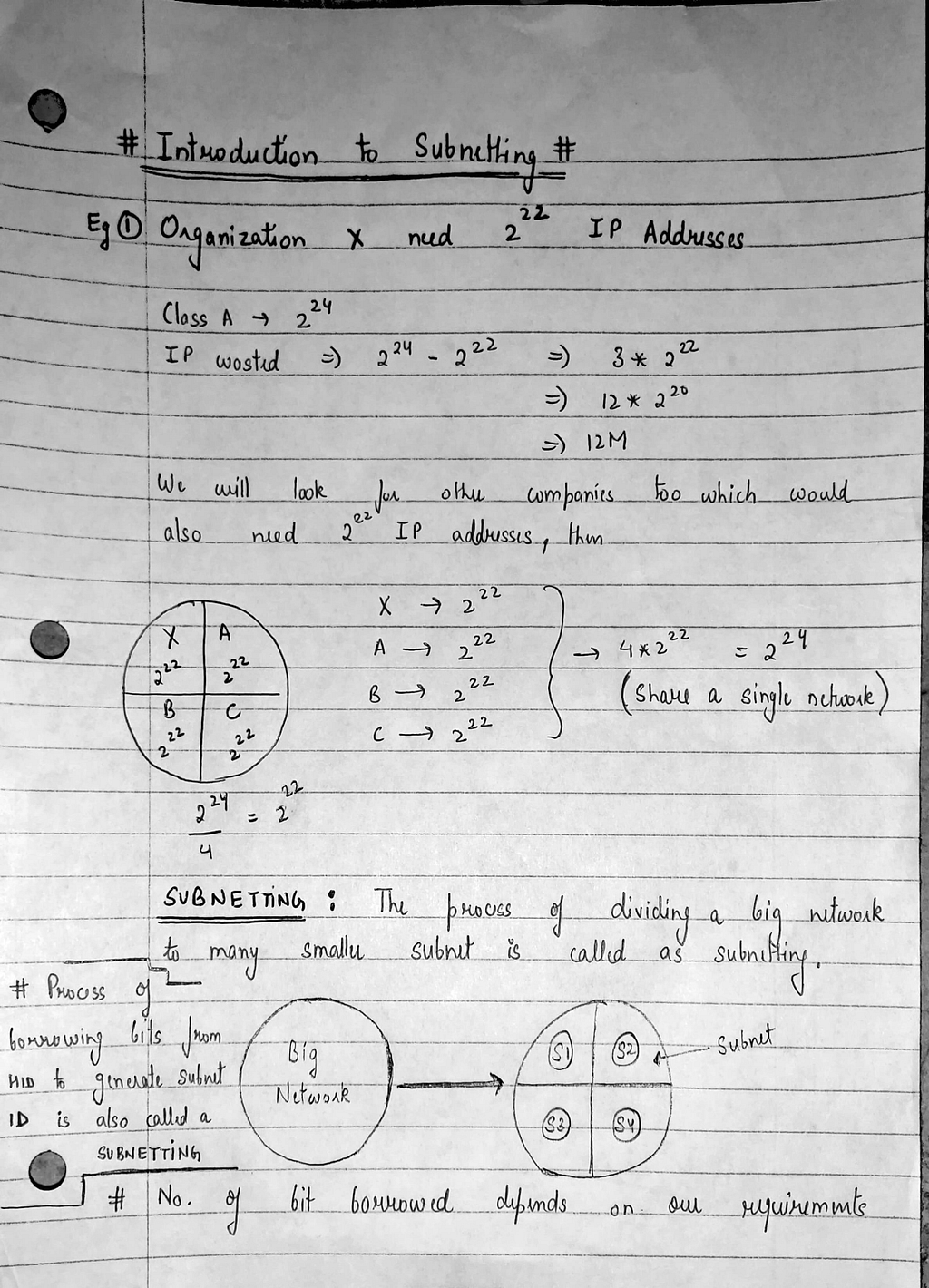
Before any OCR or text-recognition model can work properly, the document needs to be cleaned and simplified. One of the simplest and most powerful ways to do this is called thresholding. The idea is straightforward: we pick a rule that decides which pixels should turn black and which ones should turn white. When done correctly, a messy grayscale image suddenly becomes a clean black-and-white one that computers can handle easily.
In this article, we will walk through three of the most commonly used thresholding techniques: Global Thresholding, Otsu’s Method, and Adaptive Thresholding. Each method works differently, and each one shines in different situations. To make things easy to understand, we will use real examples created from an actual photograph of handwritten notes.
By the end of this guide, you will know exactly how these methods work, when to use which one, and why adaptive thresholding often becomes the most reliable option in real-world document images.
What Thresholding Really Means
A document image is nothing more than thousands of tiny grey pixels. Some pixels are very dark because they belong to the text. Some pixels are bright because they belong to the paper. And a lot of pixels sit somewhere in the middle because of shadows, notebook lines or uneven lighting.
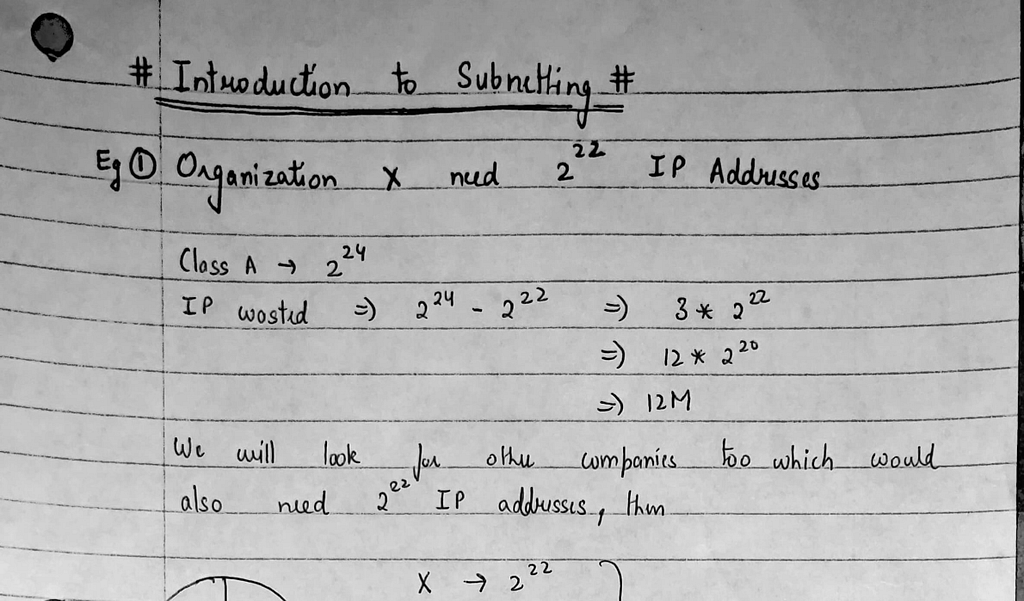
Thresholding is simply the process of choosing a number and saying:
“Everything darker than this becomes black. Everything brighter becomes white.”
With that one decision, the computer converts a messy grayscale image into a clean black-and-white one. But the challenge is choosing the right number. If the threshold is too low, everything becomes dark. If the threshold is too high, the text becomes faint or disappears. Somewhere in between lies the perfect point. The GIF below shows exactly why this is tricky. As the threshold value increases frame by frame, the entire appearance of the document changes dramatically — sometimes the page goes completely black, sometimes everything washes out. There’s no single number that works consistently for the whole image.

If you noticed that the GIF becomes darker as the threshold value increases, that is completely correct. This happens because of the way OpenCV defines its basic thresholding rule.
OpenCV’s THRESH_BINARY mode works like this:
If a pixel is brighter than the threshold → make it white
If a pixel is darker than the threshold → make it black
So when the threshold is very low (for example, T = 0), almost every pixel in the image is “brighter than 0,” which means almost everything turns white.
As the threshold increases, fewer and fewer pixels are brighter than the threshold. That means more pixels get pushed into the black category. This is why the image becomes darker and darker in the GIF, and at very high threshold values (close to 255), the entire page becomes black.
Some tutorials online might show the opposite behavior because they use the inverted version, THRESH_BINARY_INV. That version flips the rule and creates the opposite effect. But in our case, the GIF is using the normal THRESH_BINARY mode, so the darkening effect is exactly what should happen.
Thresholding sounds simple, but real images make it challenging. A phone photo rarely has even lighting. The top of the page might be darker, the bottom might be brighter, shadows may appear in one corner, and handwriting varies in darkness. All these uneven areas mean that a single threshold value is not reliable for the entire image. This is exactly why we need more advanced methods like Otsu and adaptive thresholding
Global Thresholding
Global thresholding uses one single cutoff value for the entire image. Any pixel brighter than that value becomes white, and anything darker becomes black. In OpenCV’s normal THRESH_BINARY mode, this means a low threshold keeps more of the page white, and a high threshold makes more of it turn black.
You can see this clearly in our examples. With T = 120, the output looks lighter and most of the handwriting stays visible, but the shadows and notebook lines still show up strongly.
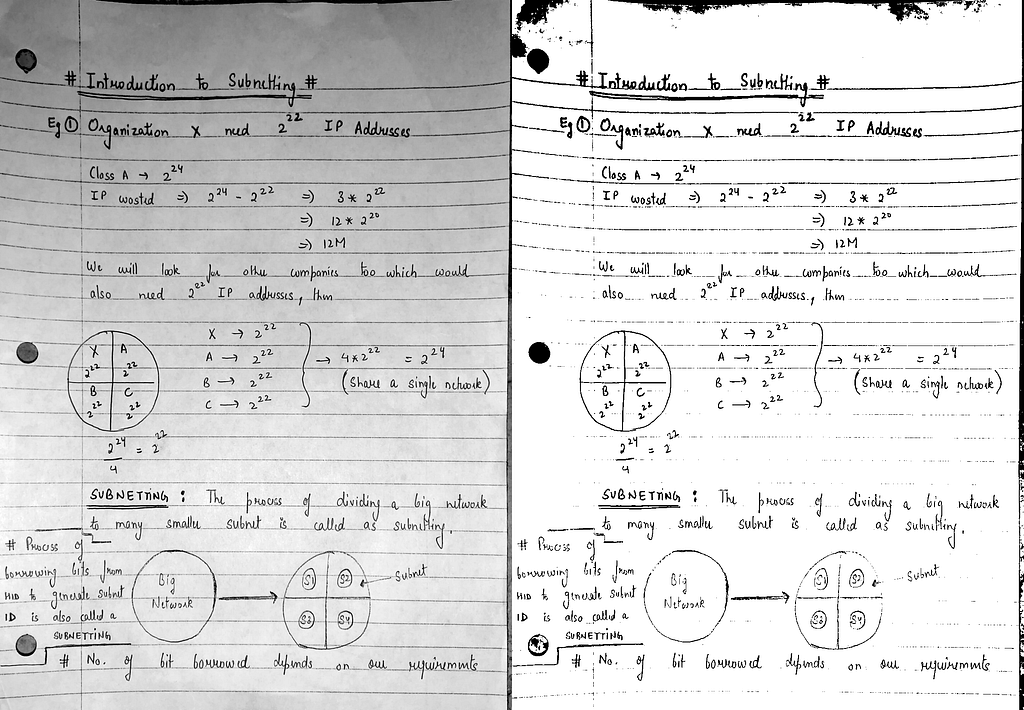
Increasing the value to T = 140 reduces some of that background noise and gives the text a bit more contrast, but it also starts removing thinner or lighter strokes of handwriting.
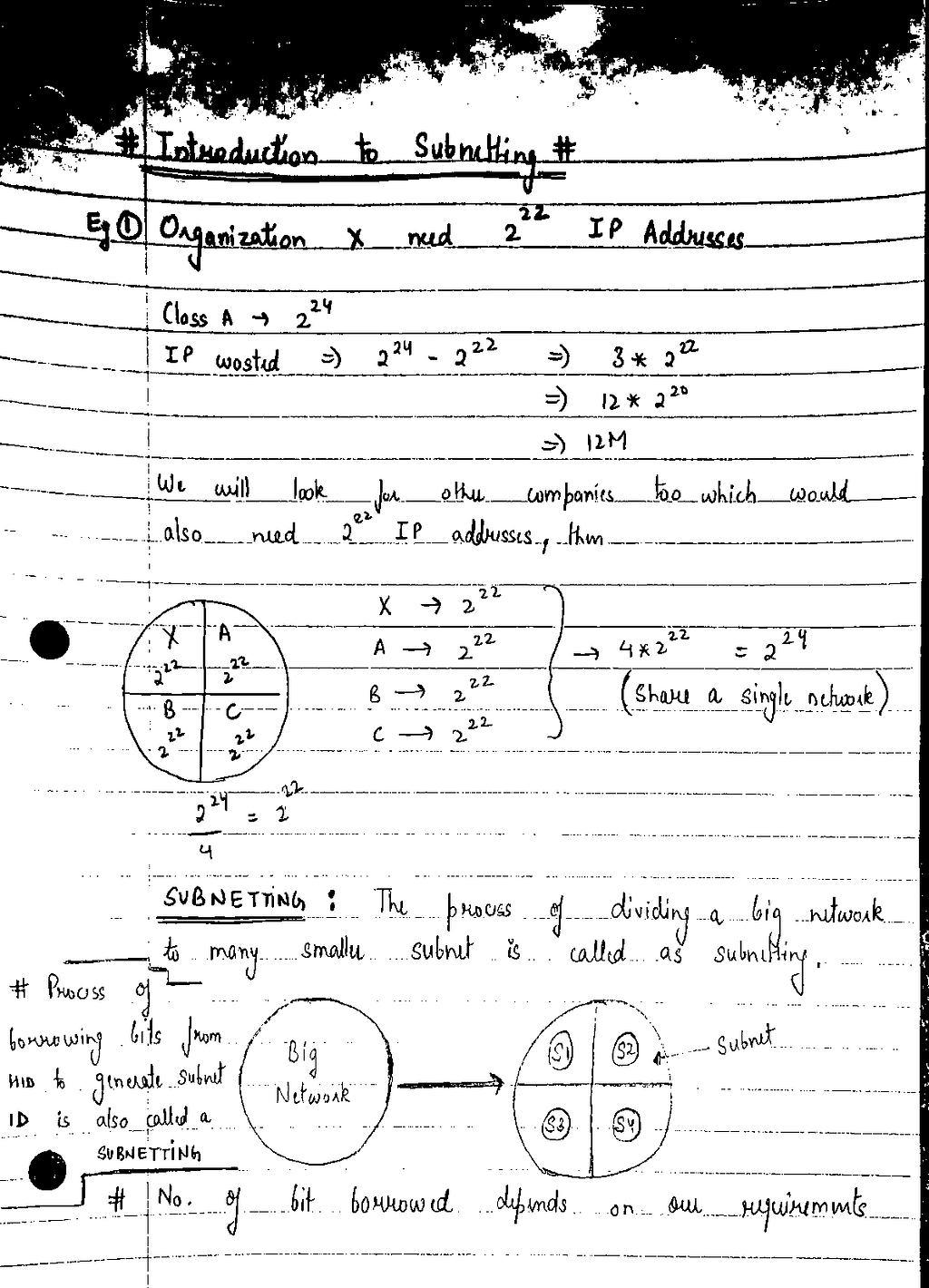
By the time we reach T = 160, the lower part of the page looks cleaner, yet much of the faint text has now vanished, and the darker shadow regions turn into large solid black patches.
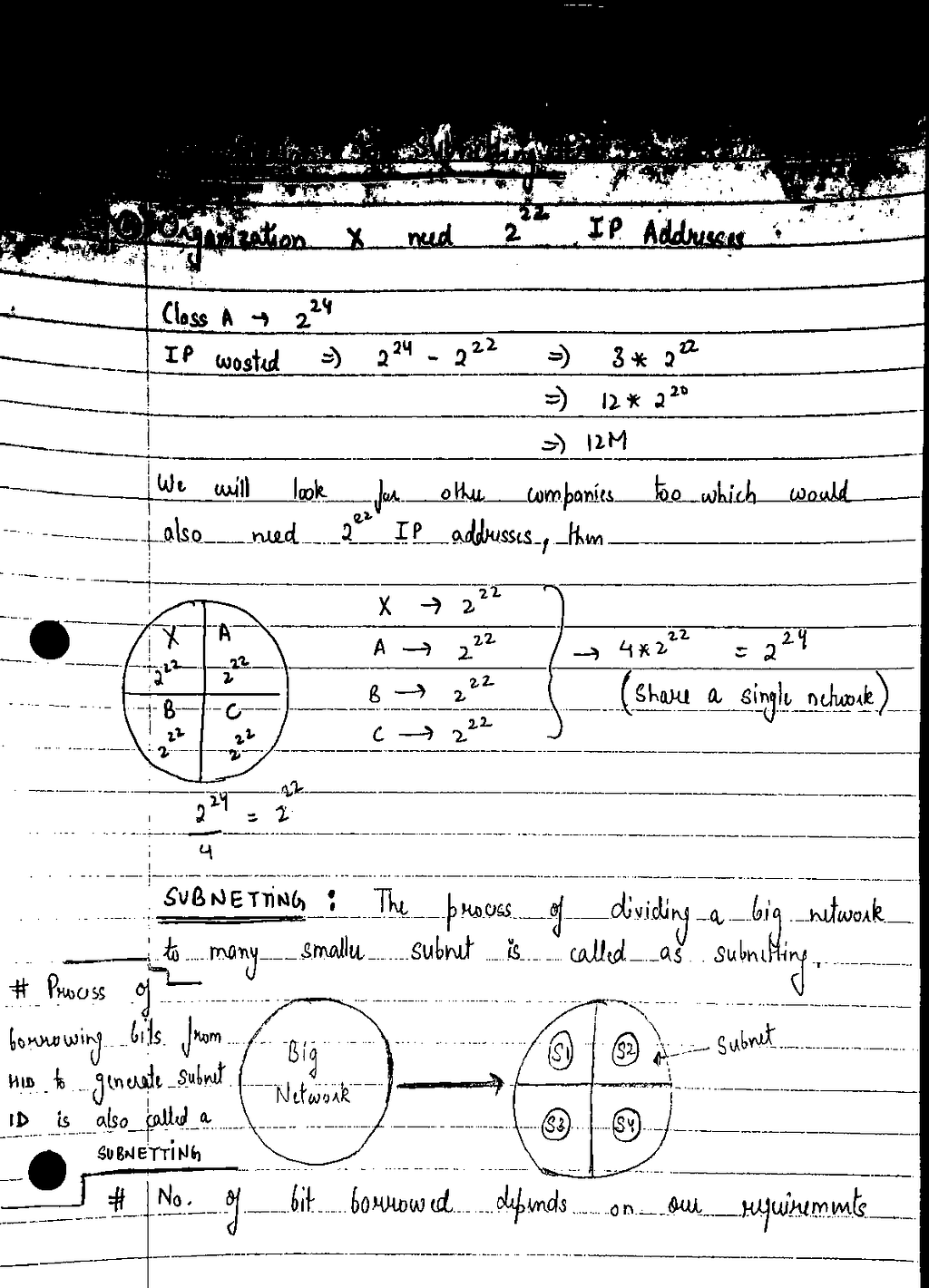
All three outputs behave differently, but none of them produce a clean document. The problem is simple: the brightness across this page is not uniform. Some areas are bright, some areas are dark, and a single global threshold cannot handle all of them at once.
Otsu’s Method
Once you understand global thresholding, the next natural question is: “Can the computer choose the best threshold value for me?”
That is exactly what Otsu’s method tries to do. Instead of manually picking a number like 120 or 160, Otsu looks at the entire image histogram and finds a threshold that best separates the pixels into two groups: background and foreground.
This idea works beautifully when an image contains two clear intensity clusters — one light group for the paper and one dark group for the text. But real photos do not always behave so neatly. Shadows, uneven lighting, notebook lines and faint handwriting all create overlapping ranges of grey. When Otsu sees this kind of messy distribution, it often picks a threshold that makes mathematical sense but visually fails.
When we ran Otsu’s method on our document, it selected a threshold of 176, as shown below:
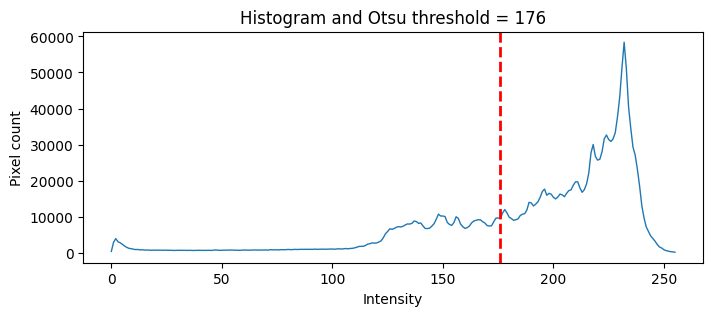
At first glance this looks reasonable, but the actual output tells a different story. The entire top section of the page, where the shadow is strongest, becomes a solid black patch. Many lighter strokes of handwriting disappear, and the notebook lines dominate the foreground. What you get is a “burnt” version of the document which is not useful anymore.
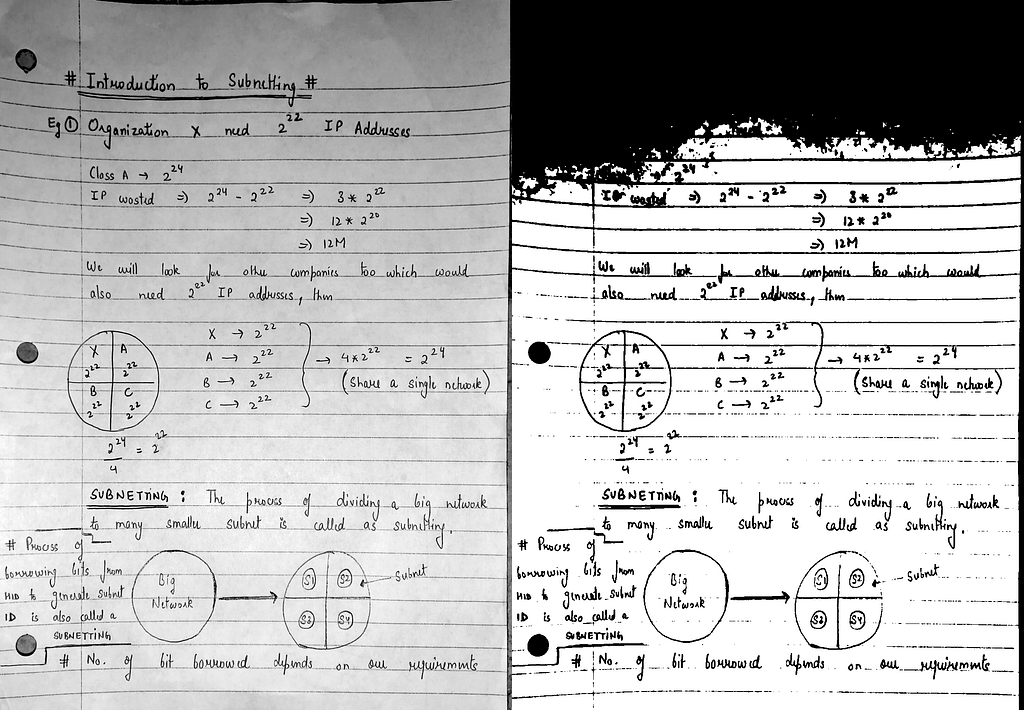
This is Otsu’s biggest limitation, that it assumes that the document contains only two major intensity groups. Our image contains at least four — the dark shadow, medium notebook lines, the light paper and handwriting that sits somewhere in between. With so much overlap between these groups, Otsu does not know what to treat as foreground and what to treat as background.
Otsu is not a bad method. In fact, it works extremely well on clean, evenly lit scans. But for real-world photos of documents like notebook pages with shadows, it struggles. And this failure is exactly what leads us to the most reliable method of all, which is known as adaptive thresholding.
Adaptive Thresholding
Global thresholding uses one cutoff for the entire page. Otsu tries to guess that cutoff automatically. Both fail for the same reason: the brightness of a real document is not uniform. One part is darker, another is brighter, handwriting varies in thickness, and notebook lines sit somewhere in between. A single threshold cannot handle all these variations at once.
Adaptive thresholding takes a completely different approach. Instead of applying one rule across the whole page, the image is divided into many small regions. Each region receives its own locally calculated threshold based on the pixel intensities around it. Dark areas get a slightly different cutoff, bright areas get their own, and mid-gray regions are handled according to their local context. This solves the biggest problem of global methods which assumes that the page is evenly lit.
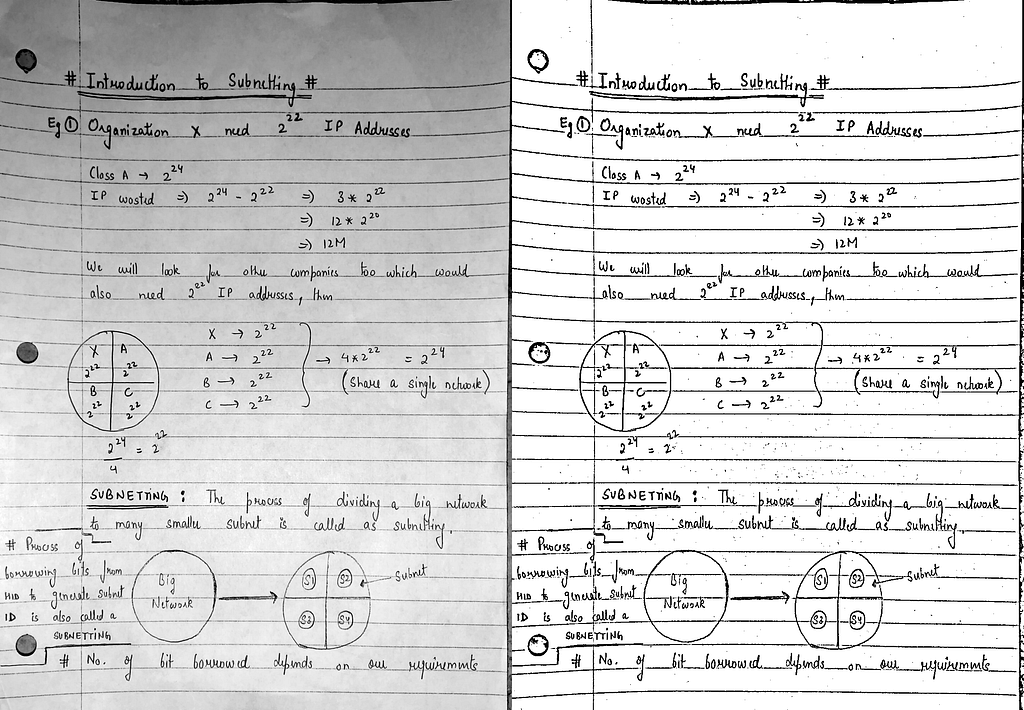
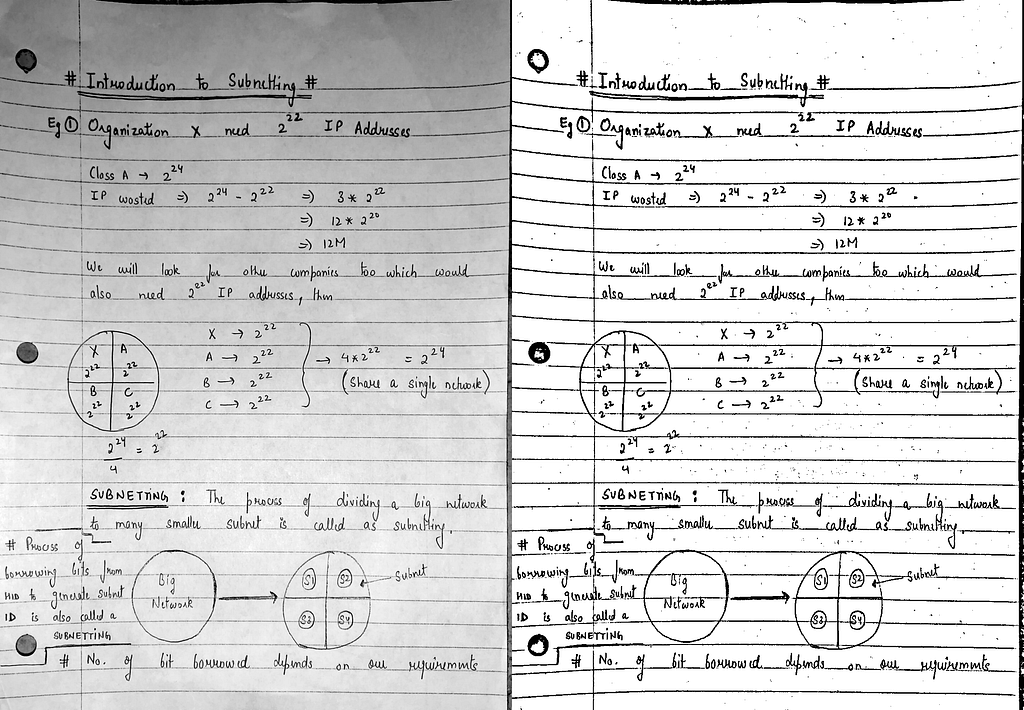
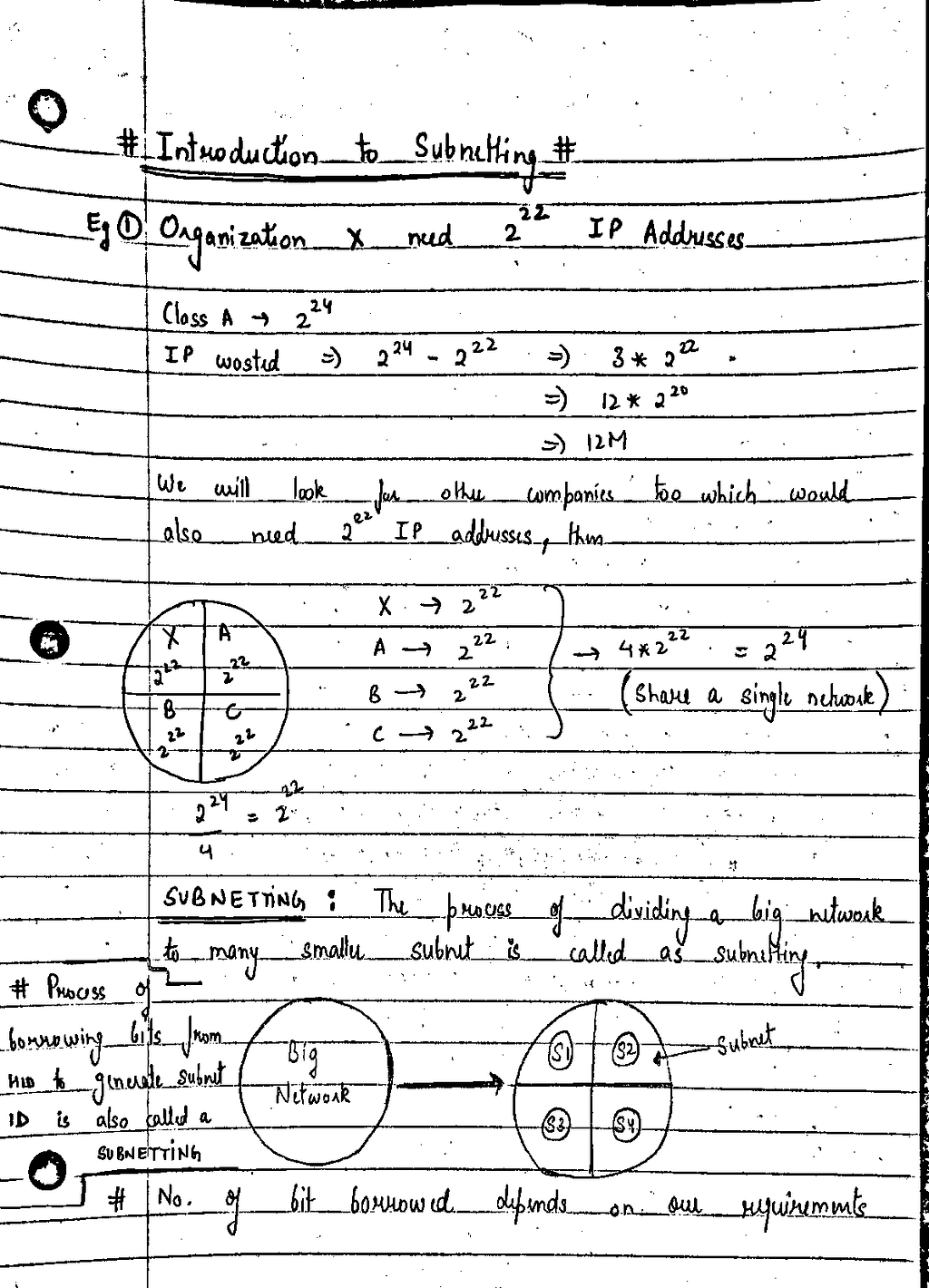
Applying Adaptive Mean Thresholding to the document immediately produces a much cleaner result. The shadow at the top no longer destroys the text. The faint handwriting stays intact. The notebook lines remain visible but no longer dominate the entire page. Every part of the document is treated according to its local brightness, which makes the output far more reliable for OCR or further processing.
Below is a comparison between the original grayscale image and the adaptive threshold result:
Here is the adaptive output alone:
We can also use adaptive gaussian thresholding instead of adaptive mean thresholding, and it works in a very similar way, but with one important detail: pixels closer to the center of each region are given slightly more weight than those at the edges. This often produces a smoother result, especially in areas where notebook lines or pen strokes create sharp transitions. On many documents, the two adaptive methods look nearly identical, but Gaussian weighting can soften harsh edges and produce a more visually stable output.
The important point is that both methods work far better than global thresholding and Otsu for real photographs of documents. Their strength comes from responding to the image locally instead of assuming the entire page has the same brightness level. The adaptive mean is simple and sharp, whereas adaptive gaussian is smoother and slightly more refined.
Adaptive thresholding is what most OCR pipelines use as the main preprocessing step, precisely because it delivers consistent, reliable results on messy, uneven, real-world document images.
Global vs Otsu vs Adaptive: A Direct Comparison
Seeing each method individually is useful, but the differences become much clearer when all of them are placed side by side. Below is a combined view of the original document, a global threshold result, Otsu’s result and the adaptive output. Even without detailed analysis, the progression tells the whole story.
The global threshold takes one number and applies it everywhere, which is why some areas look acceptable while others collapse into solid black or lose detail. Otsu chooses its threshold automatically, but because the page contains overlapping intensity levels — shadows, notebook lines, faint strokes and brighter regions — the chosen threshold destroys large parts of the page. Adaptive thresholding, which adjusts itself differently for every local region, preserves the text, handles shadowed areas intelligently and produces a clean, readable binary image across the entire page.
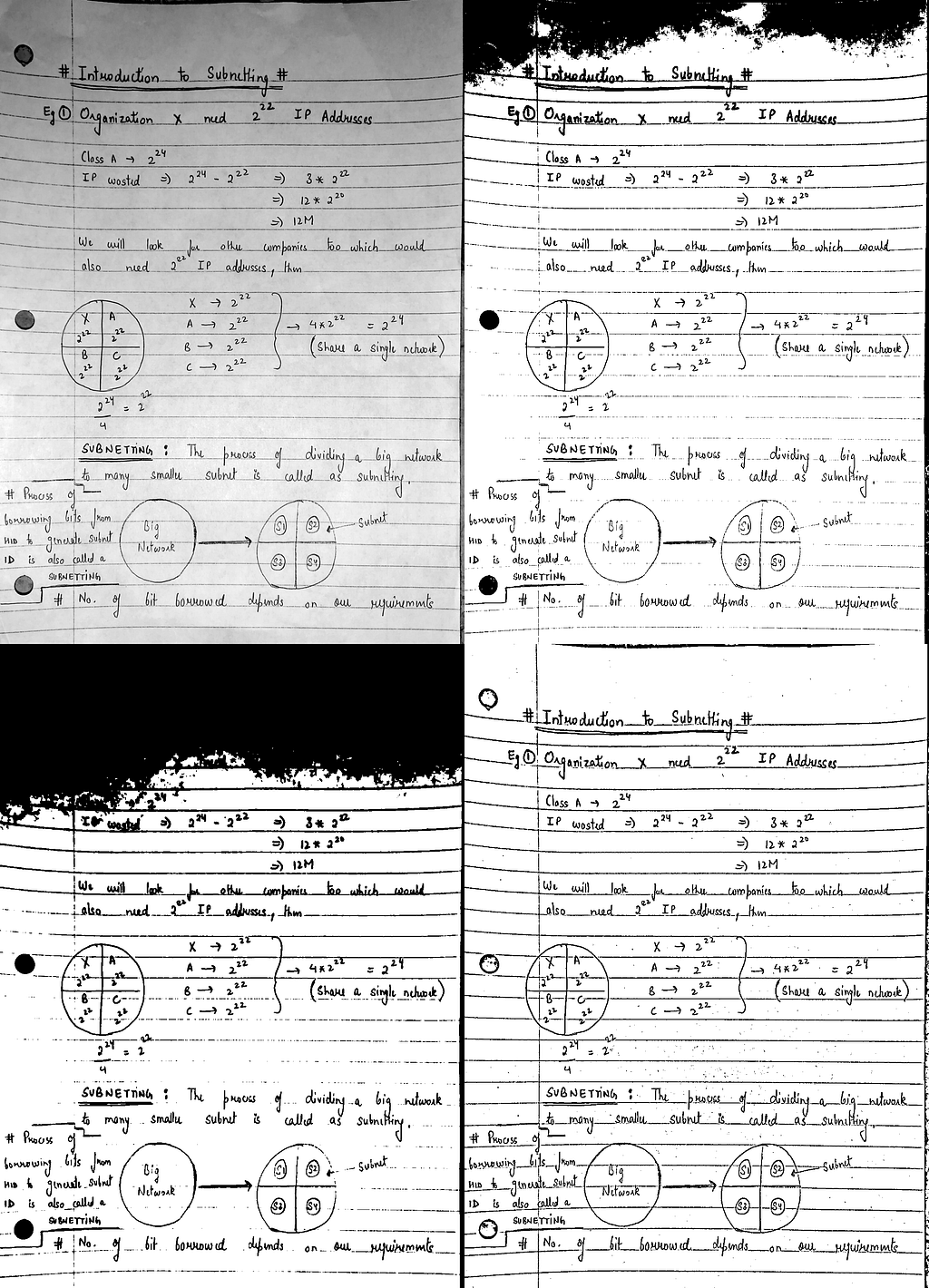
Adaptive thresholding is the only method in this comparison that does not rely on a single global decision. Instead, it reacts to the actual lighting and texture in each part of the image. This makes it far more dependable for real photographs of handwritten notes, receipts and unevenly lit documents.
When to Use Which Thresholding Method
Each thresholding technique behaves differently, and no single method works best for every situation. The examples above already show this, but it helps to summarize things clearly. Choosing the right method depends entirely on how the document looks.
Global Thresholding works best when the document has even lighting and clear contrast between the text and the background. A scanned PDF, a printed sheet under uniform light or a high-quality image taken on a flat surface can often be handled well with a single threshold value. The moment shadows enter the picture or the brightness varies across the page, global thresholding becomes unreliable.
Otsu’s Method is useful when the document has two dominant intensity groups and the page is mostly clean. Otsu finds the threshold automatically, which is helpful when processing large batches of uniformly lit scans. But when the image includes shadows, faded handwriting, notebook lines or uneven brightness, the intensity ranges overlap too much and Otsu selects a value that looks mathematically correct but visually wrong.
Adaptive Thresholding is the most dependable choice for real-world photos. It works locally instead of globally, adjusting the threshold to the brightness of each small region. This makes it extremely effective for handwritten notes, receipts, classroom notebooks and any document captured under uneven lighting conditions. When in doubt, adaptive thresholding is almost always the safest and most robust option.
Conclusion
Thresholding may sound like a small preprocessing step, but it makes a huge difference in how well a computer can understand a document. A single grayscale image can contain shadows, uneven lighting, paper texture, notebook lines and handwriting with different shades — and every thresholding method reacts to these variations in its own way.
Global thresholding is fast and simple, but it relies on one cutoff value, which rarely matches the complexity of a real photograph. Otsu’s method tries to choose this value automatically, and it works well on clean, evenly lit documents, but it breaks down the moment intensities overlap. Adaptive thresholding, on the other hand, looks at the document locally, adjusting itself to shadows and brightness changes. This is why it consistently produces the most reliable results on real handwritten notes and phone-captured documents.
Understanding how these methods behave on real images is the key to building better OCR pipelines and cleaner document processing workflows. Once you know the strengths and limitations of each technique, it becomes much easier to choose the right approach and produce consistent, readable results across a wide variety of documents.
More in Computer Vision